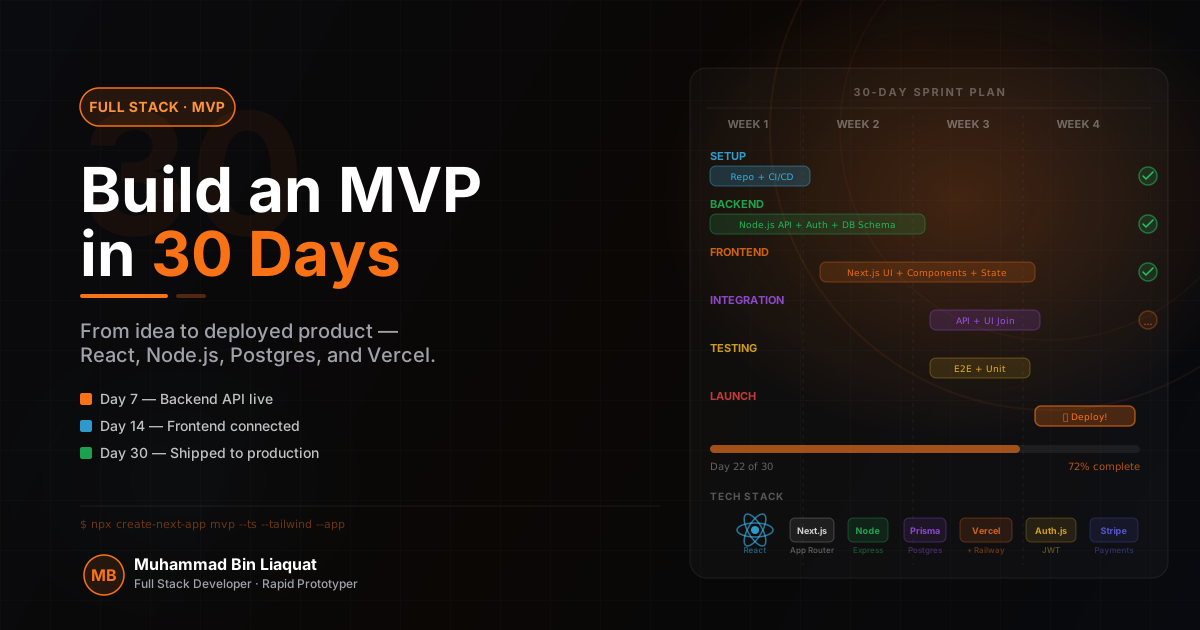
Week 1: Architecture decisions that prevent regret
The first week of an MVP build is the highest-leverage period of the entire project — and the most dangerous. This is when developers make architectural decisions under uncertainty, and the ones made for speed in week one are the ones that create the painful rewrites in month three. The goal is not to design a system that handles 10 million users; it's to design a system that can handle 10,000 users with straightforward changes, while shipping a working product by day 30.
The stack I reach for on tightly-scoped MVPs: Next.js for the frontend (App Router, deployed to Vercel or a VPS), Express with TypeScript for the API (separate service, deployed to the same VPS or Railway), and PostgreSQL for the database (managed instance on Supabase, Neon, or RDS). This stack is boring by design — all three are well-understood, well-documented, and have enormous ecosystems. When you're moving fast, the last thing you need is a framework surprise.
Database schema design in week one determines how painful pivots will be in weeks two through four. Use migrations from day one — Prisma Migrate or node-postgres with a manual migrations folder. Never modify the database directly without a migration. Design the schema conservatively: fewer tables with clear relationships, no premature optimization. Add a created_at and updated_at timestamp to every table — you will need them for sorting, caching, and debugging.
Authentication is the other major decision to make in week one. Building auth from scratch — hashing passwords, managing sessions, implementing JWT rotation — is a week-long project on its own and a security risk if done hastily. For MVPs, use Clerk, Auth0, or NextAuth.js. The cost is a monthly fee or a slightly opinionated integration; the benefit is working auth on day two with password reset, social login, and session management included.
- Choose a stack you've shipped production code with before — MVPs are not the place for tech exploration.
- Set up Prisma with migrations on day one — schema changes without migrations cause debugging nightmares.
- Use a managed auth service (Clerk, Auth0, NextAuth) rather than building auth from scratch.
- Create a shared types package if the frontend and backend are in a monorepo — API response shapes stay in sync.
- Deploy to a real environment (staging on Vercel + Railway) by end of day 3 — CI/CD confidence early.
Week 2: Core feature implementation without over-engineering
Week two is where the MVP's core value proposition gets built. By the end of this week, a user should be able to complete the primary action that defines the product — whether that's creating a project, sending a message, booking a time slot, or making a purchase. Everything else is secondary. Resist the urge to build settings pages, admin dashboards, and notification systems before the core flow works end-to-end.
Build the happy path completely before handling edge cases. A checkout flow where payment succeeds should work perfectly by day 10. The handling of expired cards, network timeouts, and webhook delivery failures can come in week three. This sequencing keeps the work visible and demoed to stakeholders — nothing kills MVP momentum faster than spending two weeks on error handling and having nothing to show.
API design in week two should prioritize simplicity and consistency over RESTful purity. Use JSON responses everywhere, use standard HTTP status codes, and design URL structures that are obvious to any developer who reads them. Don't implement pagination until you have real data to paginate — return all items for now with a TODO comment. Don't implement RBAC until you have more than one user role — a simple `isAdmin: boolean` on the user record is sufficient for an MVP.
State management on the frontend needs a decision in week two before the component tree gets complex. For most MVPs, the combination of React Query (for server state — fetching, caching, refetching) and useState/useContext (for local UI state) is sufficient and avoids the overhead of setting up Redux or Zustand. React Query's automatic caching and revalidation eliminates 80% of the useEffect patterns that cause race conditions in client-side data fetching.
- Complete the happy path end-to-end before adding any error handling or edge cases.
- Use React Query for all API data fetching — it handles loading states, caching, and refetching automatically.
- Skip pagination, filtering, and sorting in week 2 — implement them in week 3 when you have real data.
- Hold daily 15-minute planning sessions to stay on scope.
- Demo the core flow to a stakeholder at the end of week 2 — early feedback prevents week-4 rewrites.
Week 3: Resilience, validation, and real data handling
By week three, the core feature works — but it only works when everything goes right. Week three is about making the application behave correctly when things go wrong: invalid inputs, failed API calls, slow network connections, and edge cases in the data. This is the week that transforms a demo into something you'd be comfortable giving to 100 real users.
Input validation needs to be added at three levels: client-side (immediate feedback for users), API boundary (Zod schemas on every endpoint), and database constraint level (NOT NULL, UNIQUE, CHECK constraints in the schema). Validation at only one level is insufficient — client-side validation is bypassed by API clients, API validation misses database-level race conditions, and database constraints alone produce ugly errors that need to be translated into user-friendly messages.
Implement error boundaries in React to prevent individual component failures from crashing the entire application. Wrap each major section (the main content, the sidebar, the data table) in an error boundary that shows a friendly fallback UI and logs the error to Sentry. Without error boundaries, a single undefined access in a rarely-visited component can white-screen the entire app for affected users.
Background jobs are a week-three consideration for any MVP that sends emails, generates reports, processes uploads, or makes third-party API calls as part of a user action. Long-running operations should never happen synchronously in an HTTP request — they cause timeout errors and poor UX. Use BullMQ with Redis for a job queue, or a managed service like Inngest or Trigger.dev that provides job scheduling, retries, and observability without infrastructure management.
- Add Zod validation to every API endpoint's request body, query params, and path params.
- Implement React error boundaries on all major UI sections — test them by temporarily throwing in a child component.
- Add database-level constraints (NOT NULL, UNIQUE, CHECK) for all business-critical fields.
- Move any API call that takes more than 500ms to a background job with BullMQ or Inngest.
- Write integration tests for the core user flow that run in CI — catch regressions before they reach users.
Week 4: Deployment, monitoring, and the production checklist
Week four is deployment week. By day 25, the app should be running in a production environment with a real domain, SSL, environment variables configured, and a monitoring setup that tells you when something breaks. By day 30, it should be ready for its first real users — not perfect, but reliable, observable, and recoverable.
Environment variable management is a week-four necessity that's often deferred until it causes a production incident. Use a clear naming convention (NEXT_PUBLIC_ prefix for frontend-exposed variables, no prefix for server-only), validate required environment variables at application startup using a Zod schema (so the app fails loudly on misconfigured deployments rather than silently returning undefined), and never commit .env files to version control.
Set up application monitoring before the first user arrives. Sentry handles error tracking and performance monitoring for both the Next.js frontend and the Express backend. Configure alert thresholds: notify when the error rate exceeds 1%, when API response time exceeds 2 seconds, or when any unhandled exception occurs. These are things you want to know before your users report them.
Database backups are not optional. A managed PostgreSQL service like Supabase or Neon handles automated backups by default — verify the backup schedule, test a restore from backup before launch, and document the restore procedure. The one time you need the backup, you do not want to be figuring out the restore process under stress. Also configure database connection pooling (PgBouncer or Prisma Accelerate) — raw PostgreSQL connections are expensive and the default connection limit will be hit sooner than you expect under moderate load.
- Validate all required environment variables at startup with Zod — fail loudly rather than silently.
- Configure Sentry on both the Next.js app and the Express API before deploying to production.
- Test a full database restore from backup before announcing the launch.
- Set up uptime monitoring with BetterUptime or Checkly to get paged on downtime.
- Write a one-page runbook documenting how to restart the app, roll back a deployment, and restore from backup.
The trade-offs that make 30 days possible
Building an MVP in 30 days requires explicit decisions about what to defer. These are not shortcuts — they are intentional trade-offs, documented and agreed upon with stakeholders, with a plan for addressing them in the next iteration. The danger is not making trade-offs; the danger is making them implicitly, without acknowledgment, and discovering them as technical debt six months later.
Defer: comprehensive accessibility audit (do the basics — semantic HTML, keyboard navigation for the primary flow, ARIA labels on interactive elements — but a full WCAG 2.1 AA audit is a post-launch activity). Defer: i18n and localization unless explicitly required for launch markets. Defer: mobile native features. Defer: admin dashboard and internal tooling — use Retool or a SQL client for the first 90 days.
Do not defer: security fundamentals. HTTPS everywhere, parameterized SQL queries (never string interpolation), JWT secret rotation support, rate limiting on auth endpoints, input sanitization, and dependency vulnerability scanning (npm audit in CI). Security mistakes in an MVP are the ones that generate headlines — and they're all preventable with an afternoon of attention.
Do not defer: observability. Logging, error tracking, and uptime monitoring cost less than two hours to set up and are invaluable for diagnosing the production issues that will inevitably occur in the first week of real usage. Flying blind in production — no logs, no error tracking, no performance data — is the most expensive decision you can make in an MVP launch.
- Document every deferred decision in a technical debt log with priority and estimated effort.
- Never defer security basics: HTTPS, parameterized queries, rate limiting, dependency scanning.
- Never defer observability: Sentry, structured logging, and uptime monitoring are a 2-hour investment.
- Use Retool, Metabase, or direct Supabase access for internal tooling in the first 90 days.
- Schedule a post-launch technical review at day 60 to address the highest-priority deferred items.
Share this article
Help others discover this resource and extend the reach of the content.