What separates a personal AI agent from a chatbot
A chatbot waits for input and responds. A personal AI agent pursues goals. The difference is not cosmetic — it represents a fundamental architectural shift in how the system interacts with the world. A chatbot processes one message and returns one response. An agent receives a goal, decomposes it into subtasks, executes those subtasks across multiple tools and data sources, monitors progress, recovers from failures, and delivers a result — often without any human input between goal specification and outcome delivery.
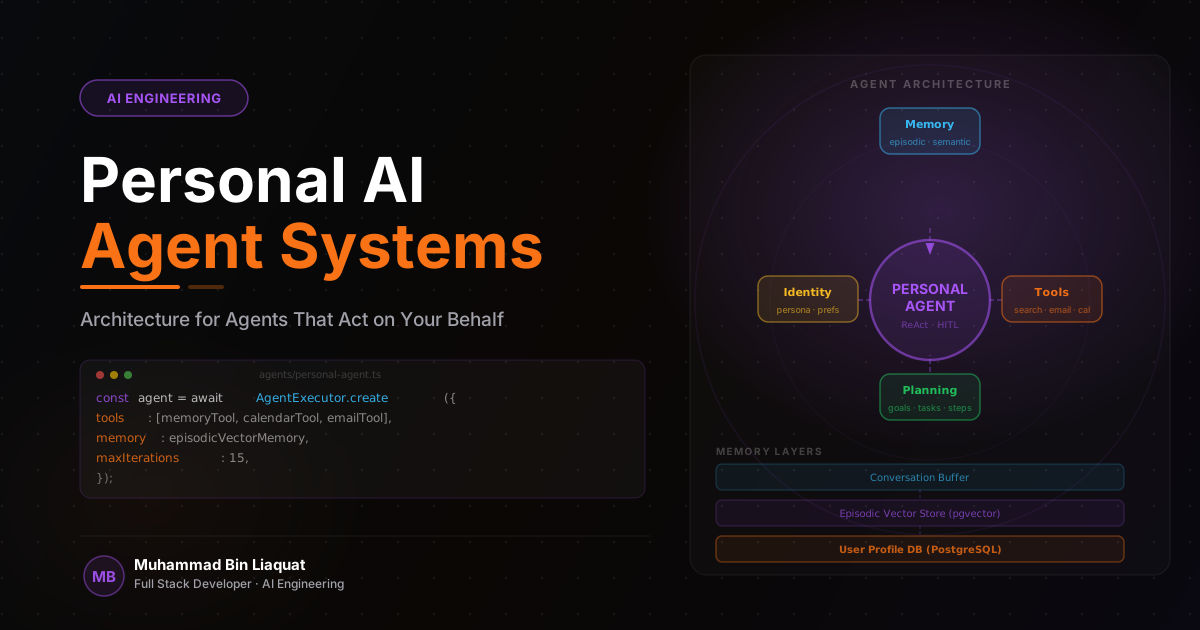
The defining capabilities of a personal agent are: persistent memory (the agent knows who you are, what you've done before, and what your preferences are across sessions), tool use (the agent can take actions in external systems, not just generate text), autonomous planning (the agent decides the sequence of steps needed to achieve a goal), and self-correction (the agent can recognize when a step failed and try an alternative approach). These capabilities are independent and additive — you can build an agent with some but not all of them, but the most useful personal agents have all four.
The failure mode that most distinguishes agents from chatbots is also what makes them powerful: agents can take actions that are hard to undo. A chatbot that produces a wrong answer can be ignored. An agent that sends an email, modifies a database record, or makes an API call on your behalf has performed an action with real consequences. This is why safety constraints and human-in-the-loop patterns are first-class architectural concerns in personal agent systems — not afterthoughts.
The practical use cases where personal agents add the most value are those with well-defined goals, multiple steps, and access to external tools: research synthesis (gather information from multiple sources and produce a structured summary), calendar and task management (check availability, schedule meetings, create tasks based on goals), document processing (extract, transform, and route documents based on content), and communication drafting (compose emails or messages based on context and preferences). These tasks share a common characteristic — they are tedious and repetitive for humans but have clear success criteria that an agent can evaluate.
- Define the specific goal domain for your agent before building any infrastructure — unfocused agents are ineffective agents.
- List the tools the agent needs access to before designing the tool interface — tool design drives agent capability.
- Identify which agent actions are irreversible — these require explicit safety constraints from the start.
- Design for the failure case: what should the agent do when a step fails or produces an unexpected result?
- Start with a narrow capability set and expand — a focused agent that does one thing well is more useful than a broad agent that does many things poorly.
Task decomposition and planning architectures
Goal decomposition — breaking a high-level goal into a sequence of concrete, executable steps — is where the intelligence of a personal agent most visibly manifests. A simple instruction like 'prepare a briefing on this company before my meeting tomorrow' requires the agent to identify what information is relevant (recent news, financial data, key personnel, products), determine how to gather it (web search, database query, document retrieval), sequence the gathering steps efficiently, and synthesize the results into a structured output. This planning process is what separates an agent from a pipeline.
The ReAct (Reasoning + Acting) pattern is the standard planning architecture for LLM-based agents. The model generates a reasoning trace — 'I need to find recent news about the company' — followed by a tool call — `web_search('company name news 2026')` — followed by an observation of the result. This cycle repeats until the model determines the goal is achieved. The reasoning trace is what makes ReAct debuggable: you can observe exactly what the agent was thinking at each step, which makes identifying incorrect reasoning straightforward.
Plan-and-Execute architectures separate planning from execution into two distinct phases. A planner LLM generates a high-level plan (a numbered list of steps), and an executor LLM executes each step sequentially, with the ability to revise the plan based on intermediate results. This separation produces more coherent plans for complex, multi-step goals because the planner can reason about the full sequence before committing to any single step. It also makes the plan inspectable and adjustable before execution begins — which is valuable for high-stakes tasks.
For tasks with multiple parallel workstreams, a multi-agent architecture where specialized sub-agents execute in parallel reduces latency. An orchestrator agent decomposes the goal and dispatches subtasks to specialized agents (a research agent, a writing agent, a data analysis agent). Each sub-agent executes independently and returns a result to the orchestrator, which synthesizes the outputs into the final deliverable. This architecture requires careful design of the inter-agent communication interface but produces significantly faster results for complex tasks.
- Use the ReAct pattern as the default planning architecture — it's debuggable and well-supported in LangChain.
- For complex goals, use Plan-and-Execute to generate an inspectable plan before execution begins.
- Display the agent's plan to the user before execution for high-stakes tasks — allow plan modification before proceeding.
- Use parallel sub-agents for multi-workstream tasks to reduce total execution time.
- Log the full reasoning trace for every agent execution — this is the primary debugging surface for incorrect behavior.
Tool integration: giving agents the ability to act
Tools are the bridge between the agent's language-space reasoning and the world's action space. Without tools, an agent can only generate text — with tools, it can search the web, read and write files, query databases, send messages, call APIs, and interact with any external system that exposes an interface. The design of the tool interface is the most consequential architectural decision in a personal agent system, because tools define the agent's actual capability boundary.
Every tool in a personal agent system needs four things: a precise name (action-oriented, unambiguous), a detailed description (when to use it, what it returns, and what its limitations are), a typed input schema (with validation constraints that prevent malformed calls), and a safe implementation (that handles errors gracefully and is idempotent where possible). The tool description is what the model reads when deciding which tool to use — ambiguous descriptions lead to incorrect tool selection even when the underlying tool works correctly.
Tool permissions should be scoped to the minimum necessary for the agent's task. A personal agent that helps manage your calendar doesn't need write access to your email. An agent that drafts emails doesn't need access to your calendar. Implementing permissions at the tool level — rather than trusting the agent to self-limit — is the correct security model. Use read-only versions of tools by default and require explicit user confirmation before enabling write access to any tool category.
Stateful tool sessions — where multiple tool calls within a single agent run share context — enable more sophisticated interactions with external systems. A browser automation tool that maintains a session across page navigation calls, a code execution tool that preserves variable state across cell executions, or a database tool that maintains a transaction across multiple queries are all examples of stateful tools. Stateful tools are more powerful than stateless ones, but they require explicit session management and cleanup to prevent resource leaks across agent runs.
- Write tool descriptions from the agent's perspective: 'Use this tool when you need to find...'
- Implement read-only variants of every tool by default — require explicit activation of write tools.
- Validate all tool inputs with a JSON schema before execution — reject malformed calls with descriptive errors.
- Implement stateful tool sessions for tools that require context across multiple calls within a run.
- Log every tool invocation with its parameters, result, and duration — tool call logs are essential for debugging.
Memory and context persistence across sessions
A personal agent that doesn't remember previous interactions is not truly personal — it's just an agent with a friendly label. Memory is what makes an agent adapt to your preferences, build on previous work, and avoid repeating the same mistakes. The memory architecture for a personal agent spans several time horizons: working memory within a single session, episodic memory of past interactions, semantic memory of facts about you and your domain, and procedural memory of how to perform recurring tasks.
Working memory is managed by the LLM context window during a session. The agent sees the full conversation history and can reference anything that happened within the current session. The practical limit is the context window size — for extended sessions with many tool calls, the context can fill up. Implement a sliding window or summarization strategy to handle long sessions: periodically summarize the conversation history into a compressed representation and replace the raw history with the summary, freeing context window space for new information.
Long-term memory requires external storage. Supabase with pgvector handles both relational storage (for structured facts: your preferences, completed tasks, contact information) and semantic memory (for retrieving past interactions by relevance). When a new session starts, the agent queries the semantic memory store for context relevant to the current goal — injecting a concise 'what I know about you' context into the system prompt before the conversation begins. This gives the agent continuity without requiring the user to re-establish context every session.
Procedural memory — how to perform recurring tasks — is best represented as stored prompts or few-shot examples rather than as free-form semantic memories. If the agent regularly performs a specific research synthesis task, store the prompt template and the few-shot examples that produce the best output for that task as a named procedure. When the agent identifies that the current task matches a stored procedure, it retrieves and applies the template rather than generating a new approach from scratch. This consistency of approach is what makes a personal agent reliably useful over time.
- Implement session summarization for long conversations — replace raw history with a summary to manage context window limits.
- Store long-term user facts in a relational database; store semantic memories in a vector database for retrieval by relevance.
- Inject relevant long-term memories into the system prompt at session start — not mid-conversation.
- Store recurring task patterns as named procedures with prompt templates and few-shot examples.
- Implement memory forgetting — allow users to delete specific memories and set TTLs on time-sensitive facts.
Safety constraints and human-in-the-loop design
Safety in personal agent systems is not about preventing all possible harms — it's about ensuring that the agent's actions remain aligned with the user's intentions and that irreversible actions are never taken without explicit authorization. The failure mode to design against is not the agent going rogue; it's the agent confidently performing the correct action for the wrong goal because it misunderstood the user's intent.
Classify every tool action as reversible or irreversible. Reversible actions (reading files, searching the web, creating draft documents) can be executed autonomously without confirmation. Irreversible or high-consequence actions (sending emails, deleting records, making purchases, publishing content) require explicit user confirmation before execution. Implement this classification at the tool level — the tool itself knows whether it's performing a reversible or irreversible action and can trigger a confirmation request automatically.
Human-in-the-loop checkpoints are confirmation gates built into the agent's tool set. The agent calls `request_confirmation(action_description, expected_outcome, alternatives)` before any irreversible action. The system pauses execution, presents the confirmation request to the user through the UI, and resumes only after receiving approval. If the user rejects the action, the agent receives the rejection (with optional feedback) and can revise its plan. This pattern keeps the agent in full control of the planning logic while ensuring human oversight at the action boundary.
Rate limiting and scope restrictions provide defense-in-depth for agent safety. Even if the agent decides to take an action that would normally require confirmation, rate limits prevent bulk actions that could cause widespread impact. Scope restrictions prevent the agent from acting on resources outside the defined boundary — an email agent can only send from your email address, not impersonate other senders; a file agent can only access the designated working directory, not the full filesystem. These constraints are enforced at the tool implementation level, not by trusting the agent's self-restraint.
- Classify every tool action as reversible or irreversible — require confirmation for all irreversible actions.
- Implement HITL checkpoints as a tool the agent calls — `request_confirmation` pauses execution until approved.
- Apply rate limits to all write tools — prevent the agent from performing bulk actions without explicit authorization.
- Scope tool access to the minimum necessary resource set — use file system sandboxing and email sender restrictions.
- Log all irreversible actions with the agent's stated rationale — this creates an audit trail for reviewing agent behavior.
Deployment and operational patterns for personal agents
A personal agent running as a long-lived background process has different operational requirements than a request-response API endpoint. Sessions may span hours or days. The agent may need to wake up at scheduled times, respond to external events, and maintain state across interrupted sessions. Designing the deployment architecture to support these requirements from the start prevents painful infrastructure rewrites as the agent's capabilities grow.
For agents that need to run on a schedule or respond to events asynchronously, a job queue architecture (BullMQ with Redis, or a managed service like Inngest) is more appropriate than a persistent long-running process. The agent's execution is modeled as a job — triggered by a schedule, a user request, or an external event — with a defined start and end state. Job metadata (the current plan, the tools used so far, the partial results) is persisted to the database between steps, enabling the agent to resume after interruption without losing progress.
Multi-session context management is the operational challenge unique to personal agents. Unlike a stateless API, the personal agent accumulates context about the user over time — their preferences, their history, their ongoing projects. This context must be stored durably, accessed efficiently, and maintained consistently across all sessions. Design a dedicated context store (a combination of a relational database for structured facts and a vector database for semantic retrieval) that is isolated from the general application database and has independent backup and recovery procedures.
Monitoring for personal agents extends beyond uptime and latency. The quality of the agent's outputs — task completion rate, user acceptance rate for proposed actions, frequency of confirmation rejections — tells you whether the agent is actually useful, which is distinct from whether it's operationally running. Collect this quality telemetry alongside infrastructure metrics and review it regularly. A personal agent that runs reliably but produces low-quality outputs is not a success — it's a slow disappointment.
- Model long-running agent sessions as jobs with persisted state — enable resume after interruption.
- Use BullMQ or Inngest for scheduled and event-triggered agent execution — avoid long-running persistent processes.
- Store user context in a dedicated, independently backed-up context store — not in the general application database.
- Track quality metrics (task completion rate, confirmation acceptance rate) alongside infrastructure metrics.
- Implement session replay — the ability to re-run a past session with a modified prompt to compare outputs.
Share this article
Help others discover this resource and extend the reach of the content.