The anatomy of a production AI automation workflow
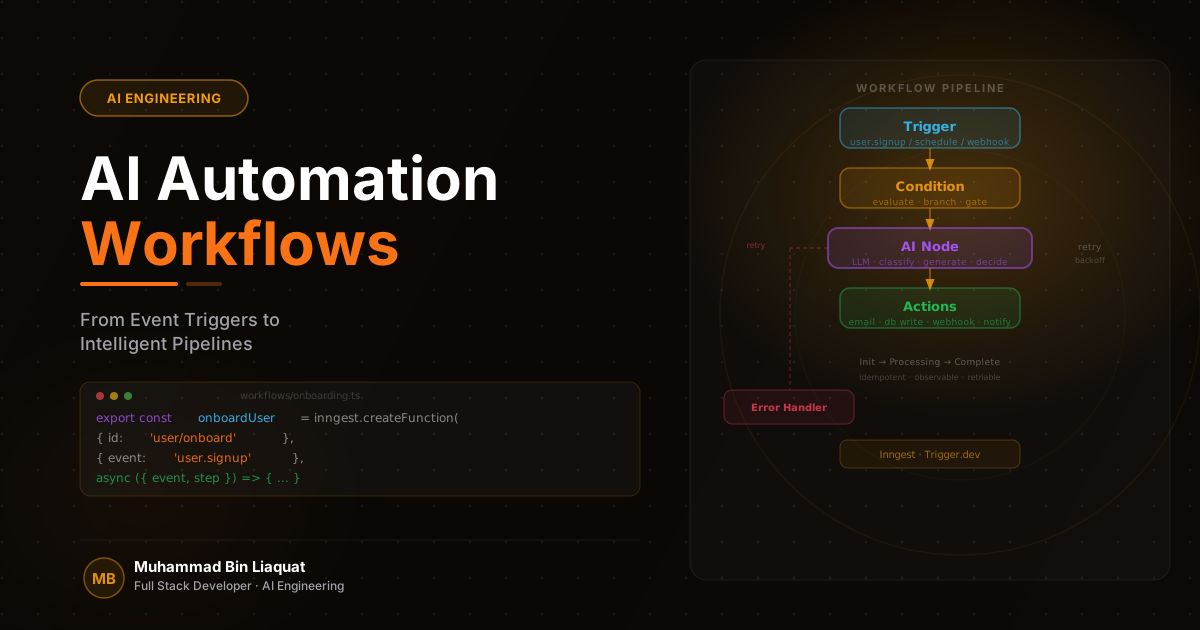
An AI automation workflow in a SaaS product is a pipeline — a sequence of steps triggered by an event, where each step transforms data and passes it forward. The event might be a file upload, a form submission, a webhook from an external service, or a scheduled job. The steps might include classification (what is this?), enrichment (what do we know about it?), AI processing (what should we do with it?), and action (write the result to the database, notify the user, trigger another workflow). The intelligence layer is embedded in one or more of those steps, not bolted on afterward.
The three qualities that distinguish production AI pipelines from prototype pipelines are idempotency, observability, and graceful degradation. An idempotent pipeline produces the same result when run multiple times on the same input — critical when retries are part of the error handling strategy. An observable pipeline exposes what happened at every step — critical when debugging failures in systems where the AI step is a black box. A gracefully degrading pipeline handles AI failures by falling back to rule-based logic or human review — critical when the cost of a missed automation is a failed user experience.
The technology stack for AI automation workflows in Node.js/NestJS applications typically includes a message queue (Kafka for high-throughput, BullMQ for lower-volume workloads), a workflow orchestration layer (NestJS event emitters, Temporal, or Inngest), an AI service client (OpenAI, AWS Transcribe, or a custom model API), and a results storage layer (PostgreSQL for structured outputs, S3 for binary artifacts). Each layer has a clear responsibility, and the boundary between them should be explicit and typed.
Synchronous versus asynchronous processing is the first architectural decision. If the automation result must be returned within the same HTTP request (live transcription preview, real-time content moderation), the pipeline must be optimized for low latency. If the result can be delivered asynchronously (batch document processing, background report generation), the pipeline can prioritize throughput and resilience. Most production AI workflows are asynchronous — the user submits a job, receives a job ID, and polls or receives a webhook when the result is ready.
- Define the trigger, steps, and expected output of each workflow before writing any code.
- Design every pipeline step to be idempotent — running the same step twice on the same input must produce the same result.
- Choose the processing model upfront: synchronous (latency-sensitive) vs. asynchronous (throughput-sensitive).
- Use a typed event schema for every workflow trigger — untyped events create debugging nightmares at scale.
- Document the failure mode of each step and the expected fallback behavior before implementation.
Event-driven triggers and workflow entry points
Every AI automation workflow begins with an event — a signal that something has happened and processing should start. The architecture of the event system determines how reliably workflows are triggered, how easily new workflows can be added, and how well the system handles high-volume trigger bursts. Designing the event system carefully upfront is far cheaper than retrofitting it after workflows are built on top of a fragile foundation.
Kafka is the right choice for high-throughput, durable event streaming in multi-service SaaS architectures. Kafka topics provide durable, replay-able event logs — if a workflow consumer fails, it can restart from where it left off without losing events. Kafka's consumer group model enables multiple services to independently consume the same event stream, which means adding a new workflow triggered by an existing event requires no changes to the producer. The offset management and partition model also makes it straightforward to reason about event ordering guarantees.
For lower-volume workloads or simpler architectures, BullMQ with Redis provides a production-grade job queue without Kafka's operational complexity. BullMQ supports job priority, delay, retry with backoff, rate limiting, and job events — all the features needed for reliable AI pipeline execution. The tradeoff is that BullMQ doesn't provide the durable event log that Kafka does; failed jobs that are not retried within the configured window are lost.
Webhook ingestion from external services (Stripe, Salesforce, Twilio, AWS S3 event notifications) is a common workflow trigger in SaaS products. Webhooks are inherently unreliable — external services retry on failure, which can cause duplicate event delivery. Implement webhook idempotency by storing the webhook event ID in the database before processing and checking for duplicates before executing the workflow. Return a 200 response immediately on receipt and process the event asynchronously to prevent the sender from timing out and retrying.
- Use Kafka for high-throughput, multi-consumer event streaming where replay capability is required.
- Use BullMQ for lower-volume job queues where Kafka's operational complexity is not justified.
- Implement webhook idempotency by storing event IDs and deduplicating before processing.
- Return 200 immediately on webhook receipt and process asynchronously — never block the webhook response.
- Design event schemas as versioned contracts — include a version field and handle schema evolution explicitly.
Pipeline stages: classification, enrichment, and action
Most AI automation workflows follow a common three-stage pattern: classification (understanding what the input is and what workflow applies), enrichment (gathering additional context needed to process the input intelligently), and action (executing the AI step and writing the result). Making this pattern explicit in the architecture — rather than collapsing all three stages into a single function — produces pipelines that are easier to test, monitor, and extend.
The classification stage determines the routing of an input through the pipeline. An uploaded document might be classified as a contract, an invoice, or a report — each requiring a different processing workflow. Classification can be rule-based (file extension, MIME type, file size thresholds), ML-based (a small classifier model), or LLM-based (a classification prompt with few-shot examples). LLM-based classification is the most flexible but the slowest and most expensive — use it only when the classification task is complex enough that rule-based and traditional ML approaches cannot handle it.
The enrichment stage gathers the additional context needed to make the AI step effective. For a document processing workflow, enrichment might involve fetching the user's account context, the document's metadata, and any previously processed documents from the same source. For a real-time transcription workflow (using AWS Transcribe), enrichment might involve retrieving the speaker's vocabulary list, custom terminology, and noise filter settings. Enrichment data should be gathered before the AI step, not interleaved with it — interleaving causes latency and makes the AI step harder to test in isolation.
The action stage executes the AI step and writes the result to the appropriate storage layer. This is where the OpenAI API call, the transcription job, the embedding generation, or the classification inference happens. Wrap the AI call in a circuit breaker: if the AI service returns errors repeatedly, stop calling it temporarily and fall back to a degraded mode rather than overwhelming a failing service with retries. Write AI outputs to the database transactionally — if the write fails, the AI computation was wasted, and the record should not be marked as processed.
- Separate classification, enrichment, and action into distinct pipeline stages with typed interfaces.
- Use rule-based classification first — reach for LLM classification only when rules cannot handle the complexity.
- Gather all enrichment data before the AI step — never interleave enrichment with AI calls.
- Wrap AI service calls in a circuit breaker — fail fast and fall back when the upstream service degrades.
- Write AI results transactionally — if the database write fails, roll back the processing state to prevent partial records.
Error handling, retries, and idempotency in AI pipelines
AI pipelines have more failure modes than traditional data pipelines because the AI step itself is non-deterministic and depends on external services. An LLM might return a malformed JSON response, a transcription service might time out on a large audio file, an embedding API might rate-limit during a bulk processing job. Each of these requires a different recovery strategy, and the error handling must be designed to work correctly in a retry context — where the same step may be executed multiple times.
Idempotency is the property that makes retries safe. A pipeline step is idempotent if running it multiple times with the same input produces the same result and has no unintended side effects. For read and compute steps, idempotency is usually natural. For write steps — inserting a record, sending a notification, calling an external API — idempotency must be explicitly designed: use upsert instead of insert, check-and-set patterns for status updates, and idempotency keys for external API calls that don't natively support them.
Retry policies should be configured per step type. Transient failures (network timeouts, rate limits, 503 responses from AI services) warrant automatic retry with exponential backoff and jitter. Permanent failures (invalid input that the AI model cannot process, schema validation errors in the AI output) should not be retried — they should be marked as failed with a structured error that explains why, routed to a human review queue, and excluded from automatic retry until the root cause is fixed.
Dead letter queues (DLQs) are the safety net for jobs that exhaust their retry budget without succeeding. Configure every job queue and Kafka consumer group with a DLQ destination. Jobs in the DLQ should trigger an alert — they represent either a systemic issue with the pipeline or an edge case in the input data that needs attention. Periodically review and process DLQ messages to identify patterns, fix the underlying issues, and replay the jobs.
- Design every write step as an upsert or check-and-set — never a blind insert that fails on duplicate execution.
- Configure retry policies per failure type: backoff for transient failures, no retry for permanent failures.
- Use idempotency keys for all external API calls that create or modify resources.
- Route exhausted-retry jobs to a dead letter queue and alert on any DLQ activity.
- Log the failure reason for every failed pipeline step — structured error codes enable systematic root cause analysis.
Scaling AI workflows with event streaming and distributed processing
A single-consumer AI pipeline that processes jobs sequentially will hit throughput limits as the SaaS product grows. The scaling architecture for AI workflows depends on whether the bottleneck is throughput (jobs per second), latency (time per job), or cost (dollars per job). Each constraint requires a different scaling strategy, and the wrong strategy for the actual bottleneck is expensive and ineffective.
Horizontal scaling — running multiple instances of the pipeline consumer — is the standard approach for throughput bottlenecks. With Kafka, increasing the number of consumer instances within a consumer group distributes partitions across instances, scaling throughput linearly up to the number of partitions. With BullMQ, running multiple worker processes on the same or different machines scales job processing throughput. Both approaches require that the pipeline steps are stateless — any shared state must live in Redis or PostgreSQL, not in-process memory.
AI service rate limits are often the actual bottleneck in AI pipelines, not the pipeline infrastructure itself. OpenAI's rate limits are per-API-key and per-model — a high-throughput pipeline will hit requests-per-minute limits during burst processing. Design the pipeline with token bucket rate limiting on the AI service client: track outgoing requests per second and delay or queue requests that would exceed the limit. Spread load across multiple API keys if the provider permits it, or use a managed service like Azure OpenAI that offers higher rate limit tiers.
Cost optimization for AI pipelines requires measuring cost per job and optimizing at the component level. Use smaller models for classification and routing steps where quality requirements are lower (GPT-4o-mini for classification, GPT-4o for complex generation). Batch embedding requests to minimize API call overhead — embed 100 chunks in a single call rather than 100 individual calls. Cache AI results for deterministic inputs — if the same document is processed multiple times, retrieve the cached result rather than re-running the AI step.
- Scale pipeline consumers horizontally — ensure all steps are stateless before adding instances.
- Implement token bucket rate limiting on AI service clients to prevent rate limit errors under burst load.
- Use smaller models for classification and routing steps — reserve large models for generation tasks.
- Batch embedding requests to minimize API overhead — process chunks in batches of 50-100.
- Cache AI outputs for deterministic inputs — document hash as cache key, results stored in Redis or PostgreSQL.
Observability and debugging in AI automation systems
AI automation systems are harder to debug than deterministic systems because the AI step is a black box — you can observe its inputs and outputs, but not its internal reasoning. When a pipeline produces an incorrect result, understanding why requires visibility into every step's execution, including the exact prompt sent to the AI, the exact response received, the enrichment data used, and the transformation applied to the output. This level of visibility requires purpose-built observability from the start.
Structured logging is the foundation of AI pipeline observability. Every step should log a structured event with: the job ID (to correlate logs across steps), the step name, the input (or a hash of the input for large payloads), the output (or a hash), the duration, and the status. This log data enables you to reconstruct exactly what happened for any job — which steps ran, in what order, with what inputs, and what results they produced. Ship logs to a centralized log aggregation service (Datadog, Elasticsearch, Loki) rather than relying on local log files.
LangSmith, Langfuse, or a custom tracing layer adds AI-specific observability on top of general structured logging. These platforms capture the full prompt, the model's completion, token usage, and cost per LLM call — data that is not captured by standard application logging. For pipelines that make multiple LLM calls (classification, enrichment, generation), this trace data is essential for understanding which call produced the incorrect result and for iterating on prompts without breaking other parts of the pipeline.
Alerting for AI pipelines should cover both infrastructure metrics (job queue depth, consumer lag, error rate) and AI quality metrics (classification confidence scores below threshold, output schema validation failures, unusually high token usage per job). Infrastructure alerts tell you when the pipeline is failing. Quality alerts tell you when the pipeline is running but producing poor results — a more subtle and often more impactful failure mode in production AI systems.
- Log a structured event at every pipeline step with job ID, step name, input hash, output hash, duration, and status.
- Ship logs to a centralized aggregation service — never rely on local log files for debugging production pipelines.
- Integrate LangSmith or Langfuse to capture full prompt/completion pairs and token usage per LLM call.
- Alert on job queue depth and consumer lag — these are the first signals of a pipeline throughput problem.
- Alert on AI quality metrics (confidence scores, schema validation failures) — poor results are often worse than failures.
Share this article
Help others discover this resource and extend the reach of the content.