WebSockets vs polling vs Server-Sent Events: choosing the right protocol
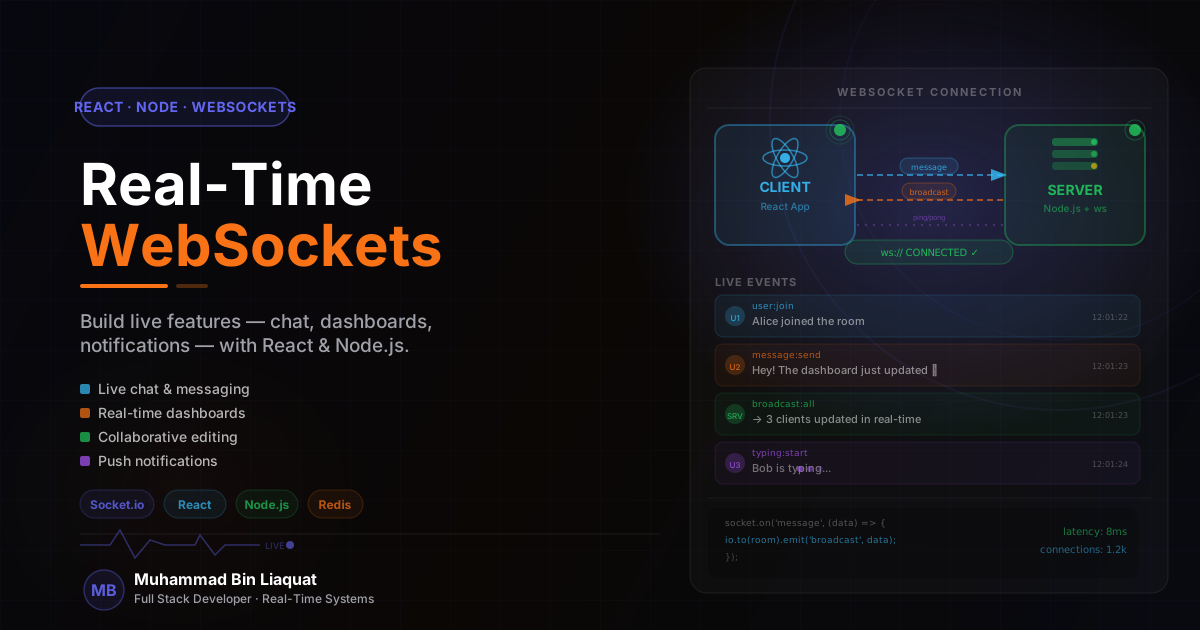
Before writing a single line of Socket.io code, it's worth understanding the three main approaches to real-time data delivery and when each is appropriate. Long polling (repeated HTTP requests) works everywhere and requires no special infrastructure, but adds latency equal to the polling interval and creates unnecessary server load. Server-Sent Events (SSE) are a lightweight, built-in browser API for server-to-client streaming over a standard HTTP connection — excellent for live feeds and notifications that are one-directional. WebSockets provide full-duplex communication over a single persistent connection — the right choice for chat, collaborative tools, games, and anything that requires the client to send data to the server in real time.
Socket.io wraps the WebSocket protocol with fallback support (it falls back to HTTP long-polling in environments where WebSockets are blocked), automatic reconnection, room and namespace management, and a clean event-based API. It adds approximately 60KB to the client bundle, which is a reasonable trade-off for complex real-time features. For simpler use cases — live notifications or a live count of online users — the native WebSocket API or SSE may be more appropriate than adding Socket.io.
The architecture decision that matters most: will your WebSocket server be the same Node.js process as your HTTP API, or a separate service? For MVPs and moderate traffic, running Socket.io alongside Express on the same process is simpler. For high-traffic applications, separating the WebSocket server allows independent scaling — you might need ten WebSocket servers to handle connection volume while three HTTP servers handle API traffic. Plan for the eventual separation by keeping WebSocket event handlers in a dedicated module from the start.
One architectural concern specific to WebSockets: they bypass HTTP infrastructure (CDN, load balancers) that most teams take for granted. WebSocket connections are stateful and long-lived — they need to connect to a specific server instance for the duration of the session. Load balancers need sticky sessions (consistent hashing by IP or cookie) to route a client's WebSocket upgrade request to the same server that handled their previous WebSocket connection. Without sticky sessions, the upgrade handshake may succeed on one server while the client's session data lives on another.
- Use SSE for one-directional server-to-client data streams — simpler than WebSockets for notifications.
- Use WebSockets (via Socket.io) for bidirectional real-time communication: chat, collaboration, live cursors.
- Keep WebSocket event handlers in a dedicated `src/sockets/` module — not inline in the server entry point.
- Configure load balancer sticky sessions before deploying to multiple server instances.
- Set a Socket.io `pingTimeout` and `pingInterval` to detect dead connections and free server resources.
Setting up Socket.io with authentication and namespaces
A Socket.io server setup begins with attaching the Socket.io server to the existing HTTP server (not the Express app directly): `const io = new Server(httpServer, { cors: corsOptions })`. The CORS configuration on the Socket.io server is independent of Express's CORS middleware and must be configured explicitly — a common source of connection failures when first setting up Socket.io with a separate frontend origin.
Authentication is handled in Socket.io middleware — code that runs for every new connection before the socket is added to any room or receives any events. The standard pattern: extract the JWT from the socket's handshake auth object (sent by the client as `{ auth: { token: '...' } }`), verify it, and attach the decoded user to the socket data object. If verification fails, call `next(new Error('Unauthorized'))` which prevents the connection from being established and triggers an error event on the client.
Namespaces partition the Socket.io server into isolated communication channels with independent middleware and event handlers. Use namespaces to separate concerns: a `/chat` namespace for messaging, a `/notifications` namespace for system alerts, a `/collaboration` namespace for document editing. Each namespace can have its own authentication logic — the notifications namespace might allow read-only connections without authentication, while the chat namespace requires a valid user session.
Rooms are dynamic groupings within a namespace — a socket can join and leave rooms at any time, and messages emitted to a room are received only by sockets in that room. Rooms are the mechanism for targeting events at specific groups: all users in a given conversation, all editors of a specific document, all members of a specific organization. The pattern for joining a room: the client emits a 'join' event with a room identifier, the server validates that the user has permission to join, then calls `socket.join(roomId)`.
- Authenticate in Socket.io middleware using the handshake auth object — not via a custom event.
- Attach the verified user to `socket.data.user` for access in all event handlers.
- Use namespaces to partition functionality with different auth requirements.
- Validate room membership permissions on the server before calling `socket.join()`.
- Emit `socket.to(roomId).emit()` for room broadcasts that exclude the sender, `io.to(roomId).emit()` for broadcasts that include the sender.
Real-time presence indicators: who's online
Presence indicators — showing which users are currently active — are one of the most requested real-time features in collaborative tools and chat applications. The implementation requires tracking the connection state of each user across potentially multiple Socket.io connections (a user might have the app open in two browser tabs), and broadcasting connection/disconnection events to the appropriate audience without flooding the system.
Store online presence in Redis (a hash or sorted set) rather than in-memory on the Socket.io server. When a socket connects, increment a counter for the user: `redis.hincrby('presence', userId, 1)`. When a socket disconnects, decrement: `redis.hincrby('presence', userId, -1)`. Only emit a 'user online' event when the counter goes from 0 to 1, and only emit a 'user offline' event when the counter goes to 0. This prevents spurious online/offline events when a user has multiple tabs open.
Broadcast presence changes only to users who care about them. In a team chat application, only the members of the same workspace need to know when a specific user comes online. Emit the presence change to the workspace room rather than to all connected clients. For large organizations with hundreds of online members, debounce the presence updates on the server: batch presence changes into 5-second windows and emit a single bulk update rather than an individual event for each change.
Handle the reconnection window gracefully. When a client temporarily loses connectivity (mobile network switch, laptop sleep), Socket.io's automatic reconnection fires within seconds. If you immediately emit 'user offline' on disconnect, the user will appear to blink offline and online again on every network hiccup. Add a grace period: wait 10-15 seconds after disconnect before emitting the offline event, using a Redis expiring key or a server-side timer. Cancel the timer if the user reconnects within the grace period.
- Store presence in Redis with a per-user connection counter — not a simple boolean flag.
- Only emit online/offline events at the 0→1 and N→0 transitions, not on every connection.
- Broadcast presence changes to a room (workspace, project) not to all connected clients.
- Add a 10-15 second grace period before emitting 'user offline' to handle brief disconnections.
- Return the full presence list as part of the room join response so new joiners get current state immediately.
Optimistic updates and reconciliation in React
Real-time interfaces feel fast when they respond to user actions immediately — before the server has confirmed the change. This technique, optimistic updates, applies the expected result of an action to the local UI state instantly and then reconciles with the actual server response when it arrives. The challenge is handling the case where the server rejects the action — the UI needs to roll back to its pre-action state cleanly.
In a chat application, the optimistic update flow for sending a message: the user types and presses send, the client immediately adds the message to the local list with a `status: 'pending'` flag and a client-generated temporary ID, the client emits the 'send_message' event via Socket.io, and when the server acknowledges with the permanent message ID, the client replaces the pending message with the confirmed version. If the server responds with an error, the client marks the message as `status: 'failed'` and shows a retry option.
Socket.io acknowledgments are the mechanism for request-response patterns over WebSockets. Instead of `socket.emit('send_message', data)`, use `socket.emit('send_message', data, (response) => { /* handle ack */ })`. The callback receives the server's response — a confirmation, an error, or a payload — and enables proper reconciliation. Without acknowledgments, you're working with fire-and-forget semantics and cannot detect individual message failures.
Reconciliation between optimistic local state and real-time server state can create conflicts in collaborative applications. When two users edit the same item concurrently, a last-write-wins strategy is simple but can cause data loss. Operational transformation (complex) or Conflict-free Replicated Data Types (CRDTs, simpler) are the principled approaches for conflict-free collaborative editing. For most business applications, last-write-wins with a visible 'this was updated by another user' notification is a pragmatic middle ground.
- Apply optimistic updates with a `status: 'pending'` flag and a client-generated temp ID.
- Use Socket.io acknowledgments for all client→server events that need confirmation.
- Roll back optimistic state on acknowledgment failure — show an error with a retry action.
- For collaborative features, use versioning or timestamps to detect and surface concurrent edit conflicts.
- Reconcile optimistic state with the server's authoritative list on reconnection to catch missed updates.
Scaling WebSockets beyond a single server
A single Node.js Socket.io server handles thousands of concurrent connections without issue on a modern VPS. The scaling problem appears when you need to run multiple server instances — for fault tolerance, for handling peak load, or because a single server has hit memory or CPU limits. The fundamental challenge: a client connected to server A cannot receive messages emitted by server B unless there's a shared communication layer.
The Socket.io Redis adapter (`@socket.io/redis-adapter`) solves this by using Redis Pub/Sub to synchronize events across server instances. When server A emits an event to a room, the Redis adapter publishes it to a Redis channel. All Socket.io instances subscribe to that channel and forward the event to any locally connected clients who are members of that room. From the application code's perspective, nothing changes — `io.to(roomId).emit(event, data)` works identically whether there are one or ten server instances.
Horizontal scaling requires load balancer configuration changes. Enable sticky sessions (consistent hashing by client IP or a session cookie) to ensure that a client's WebSocket upgrade request is always routed to the same server instance that handled their initial HTTP connection. Most load balancers (Nginx, AWS ALB, Cloudflare) support sticky sessions — but they must be explicitly configured, as the default is round-robin which breaks WebSocket upgrades.
Monitor WebSocket-specific metrics in production: concurrent connection count (per instance and total), connection establishment rate (connections per second — a sudden spike indicates a reconnection storm), event throughput (events per second), and average event processing latency. These metrics are more meaningful than HTTP request rate for WebSocket-heavy applications. Socket.io's built-in admin UI (`@socket.io/admin-ui`) provides a real-time dashboard for these metrics without any custom instrumentation.
- Install `@socket.io/redis-adapter` before deploying more than one Socket.io instance.
- Configure sticky sessions on your load balancer — required for WebSocket connections.
- Monitor concurrent connection count and connection establishment rate as the primary scaling metrics.
- Use Redis Pub/Sub for horizontal event broadcasting, not direct HTTP calls between server instances.
- Set a `maxHttpBufferSize` on the Socket.io server to prevent large payload denial-of-service attacks.
Share this article
Help others discover this resource and extend the reach of the content.